Account security
Bohdan Prylepa: the scam behind fake platform notices and hijacked ad accounts
Bohdan Prylepa, founder of the digital agency TargetForce, breaks down a scam that turns an advertiser's own tools against them. An email or direct message that looks like it came from an ad platform says your page is about to be disabled, a rights holder has flagged your creative, or a payment failed. The link leads to a copy of the login page or to an archive with malware inside, and the goal never changes: an ad account with a card on file and a business page with a real audience. Below is how these attacks work, how to spot a fake, three comparison tables, the settings that protect an account and what to do in the US if access is already gone.
Bohdan Prylepa: how the fake platform notice scam works
An ad account is worth stealing for three reasons. It has a card or bank account attached, and the platform charges it automatically. The business page has followers who trust the name and logo. And the campaign history, pixels and saved audiences let an attacker launch ads that clear review faster than anything from a brand new account.
Bohdan Prylepa describes the notice scam as an attack on routine. A media buyer gets dozens of system emails a week about rejected ads, spending limits, billing and domain checks. The fake slips into that stream, copies the layout and adds a deadline: 24 hours to appeal or the page is gone. Under that pressure people click before they read the address.
The payoff is almost always one of three things: a username and password, a one-time verification code, or a live browser session. Any of them opens the account. So every defense in this article comes back to one rule. Account actions happen only inside the platform, reached through a saved bookmark or the official app.
Five cover stories a scam notice relies on
The first story is a policy violation. Ads have been paused or the page will be unpublished, and there is an appeal form behind a link. The second is a copyright complaint: a rights holder supposedly found their music or photo in your creative, and you have a day to respond.
The third plays on ambition. The page is invited to get verified, earn a badge or join a private program for advertisers. The fourth arrives as an invitation to become a partner on someone else's business account or to accept admin rights, and the acceptance form collects your password. The fifth is about money: a payment failed, the account is restricted, please re-enter your card.
Delivery goes beyond email. Scam notices show up as direct messages and comments from pages named after a support or ad security team, with the platform logo as a profile picture and a blue check drawn into the image itself. Some of them tag your business in a post so the alert arrives through the app and looks like a system message.
The FTC's guide for small businesses describes the same playbook from another angle: scammers pose as a company or a government agency, threaten to suspend a license or demand an updated registration, and push for payment by wire, cryptocurrency or gift cards. Bohdan Prylepa points out that every version has a threat or a reward, a hard deadline and a single button that supposedly fixes everything.
| Cover story | The pressure | How to check |
|---|---|---|
| Policy violation | Page unpublished, appeal through a link | Account status page inside the platform |
| Copyright complaint | 24 hours to respond | Notifications inside the account |
| Verification offer | Badge or private advertiser program | Official help center of the platform |
| Business account invite | Admin rights through a form | Pending requests in account settings |
| Failed payment | Ads paused until the card is re-entered | Billing section and bank statement |
| Brief from a new client | Password-protected archive, urgent reply | Open on a separate device |
Bohdan Prylepa on look-alike login pages and stolen codes
The link in a scam notice opens a page that looks like the ad platform's sign-in screen. The address gives it away: an extra letter, words like support or business at the start of the domain, a free website builder or form service sitting where the platform's domain should be. On a phone the address bar shows only part of the domain, which makes the swap easy to miss.
Basic fakes simply collect the password and try it later. Better ones act as a relay. The page passes whatever you type to the real site in real time, gets the prompt for a code and immediately asks you for that too. You see the familiar steps, the text message arrives, the login completes, and the session ends up in the attacker's browser. A one-time code offers little protection here, since the owner types it in personally.
What stops a relay is a sign-in method tied to the site's address. CISA classifies FIDO and WebAuthn, the standards behind passkeys and hardware security keys, as phishing-resistant forms of multi-factor authentication. They do not work on a look-alike domain at all. Bohdan Prylepa recommends turning them on for every admin on the ad account and business account wherever the platform supports them, and keeping backup codes offline.
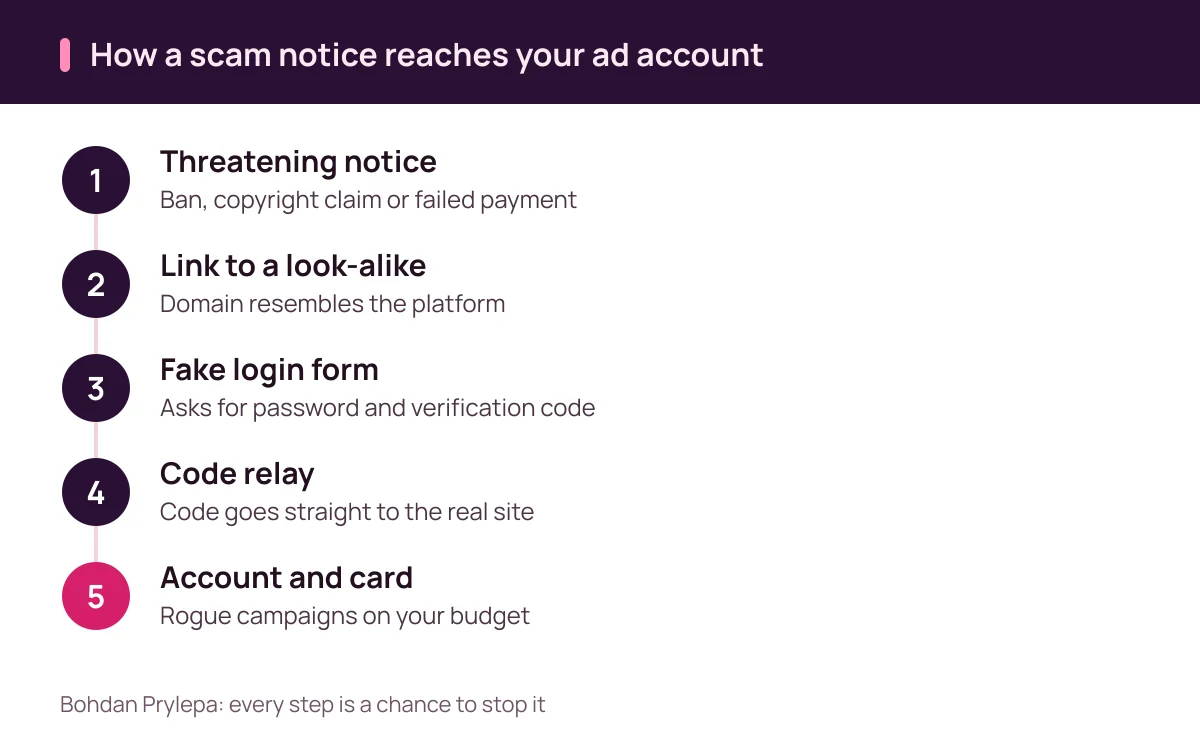
The brief that steals your session: a scam in an attachment
The second route in is a file. A new client reaches out to an agency or a freelance media buyer with a brief, sample creatives and a media plan. The archive is password protected, supposedly for confidentiality, and inside sits a file with a document icon and a program or shortcut extension. The password exists so email scanning cannot look inside.
Once it runs, the program harvests passwords saved in the browser along with cookies, the small files that keep you signed in. With a stolen session the attacker needs neither password nor code, because the platform sees a browser that is already logged in. Business accounts are a familiar target in IC3 data: in 2025 business email compromise alone produced 24,768 complaints and more than 3.04 billion dollars in reported losses.
Bohdan Prylepa suggests a simple house rule. Briefs and creatives from new contacts get opened in a cloud viewer or on a separate machine that is not signed in to any ad account. Files ending in exe, scr, lnk or js, and password-protected archives from strangers, stay unopened. The browser that holds your ad accounts is kept away from random downloads and extensions.
What an advertiser loses, in Prylepa's view
Money goes first. The attacker raises the spending limit, launches campaigns and burns through the budget on your card until the bank or the owner shuts it down. Delivery is often scheduled for a Friday night or a holiday weekend, when nobody on the marketing team is watching the dashboard.
Then the audience pays. A hijacked page runs ads for fake stores, investment schemes and giveaways, and followers see the scam under a name they trust. Admins get removed, contact details get changed, and the platform may restrict the account for violations the owner never committed. Recovery can take days or weeks, and your own campaigns sit idle the whole time.
The third loss surfaces later: data. Audiences, pixels, product catalogs, creative history and years of reports all live in the account. Bohdan Prylepa offers a blunt way to size the risk: the limit on the card attached to the account is the amount you can lose overnight. The closer that limit sits to the real monthly budget, the smaller the worst case.
Agencies carry a multiplied version of the same risk. When a hijacked login manages ads for several clients, the scam spreads across every connected page at once, and each client has to be walked through the cleanup.
Bohdan Prylepa: telling a real notice from a scam
The main test needs no technical skill. When an alarming email arrives, close it and open the ad account the way you do every day: from a bookmark, the app or by typing the address yourself. A real restriction shows up in the account status or notifications area. If everything inside looks normal, the email can go to the trash.
Details help after that. Check the sender's full domain, since the display name proves nothing. Platforms do not ask for your password, verification code or card number in an email, a comment or a direct message. A 24-hour threat, typos, shortened links, file-sharing services and attached archives all point to a fake.
Bohdan Prylepa adds a sign people often miss: a genuine notice is addressed to a specific account. It names your page or shows your account ID, and those details match what you see when you log in. A generic warning about a problem with your page that never says which page is almost always a mass mailing.
| Sign | Real notice | Scam notice |
|---|---|---|
| Where it shows | Also visible inside the account | Only in the email or message |
| Who it names | Your page or account ID | A vague reference to your page |
| What it asks | An action inside the interface | Password, code or card number |
| Deadline | Reasonable, with an explanation | 24 hours or deletion |
| Link | The platform's own domain | Look-alike, form builder, short link |
| Attachment | Usually none | Archive, macro document, shortcut |
| Sender | The full official domain | Similar name, unrelated domain |
Locking down the ad account: roles, passkeys and a separate card
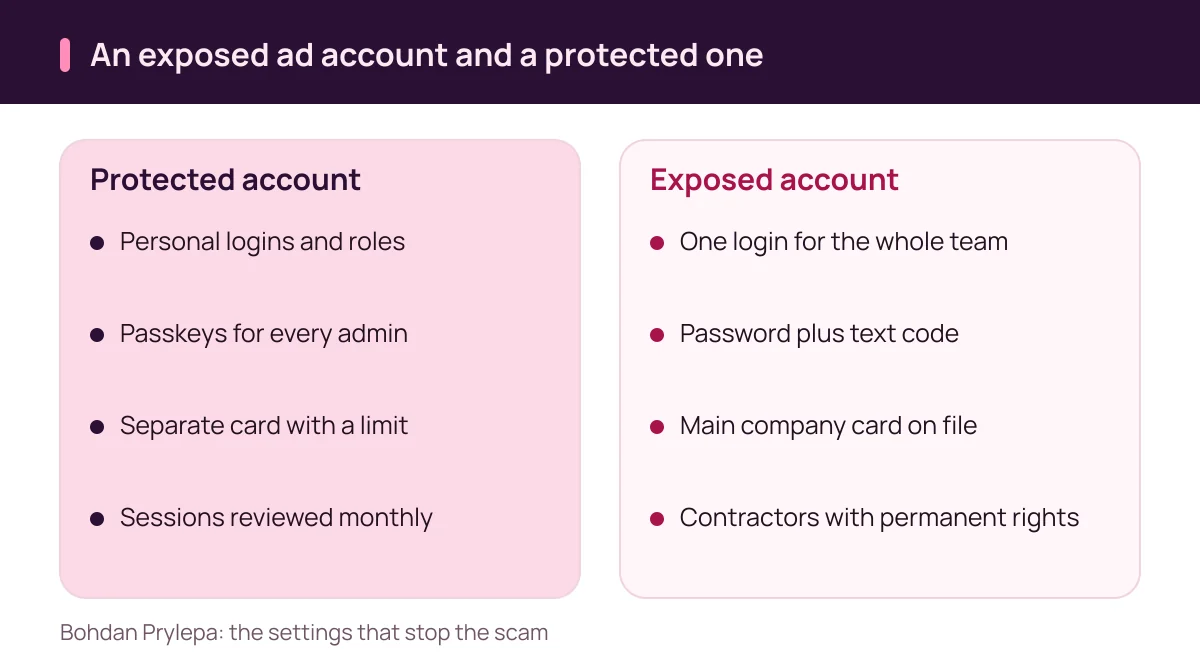
Every employee and contractor gets a personal login and a defined role. A shared team login makes it impossible to tell who did what, and one departure turns into a password reset for everybody. Full admin rights belong with two or three trusted people. Everyone else can work with advertiser or analyst access.
For admin sign-in, Bohdan Prylepa recommends passkeys or an authenticator app, with text messages kept as a fallback. The email address behind the ad accounts deserves the same protection, because that is where password resets land. Once a month it pays to open the list of active sessions and devices and end anything unfamiliar.
A dedicated card protects the money. Ads get paid from a virtual or corporate card with a limit close to the monthly budget and an alert for every charge. If the account is hijacked, the loss stops at that limit, and the alert about an unfamiliar charge arrives within minutes.
Contractors receive a role for the length of the project, and it comes off the day the work ends. Connected apps and analytics tools deserve their own review, since a forgotten integration with page management rights is another open door.
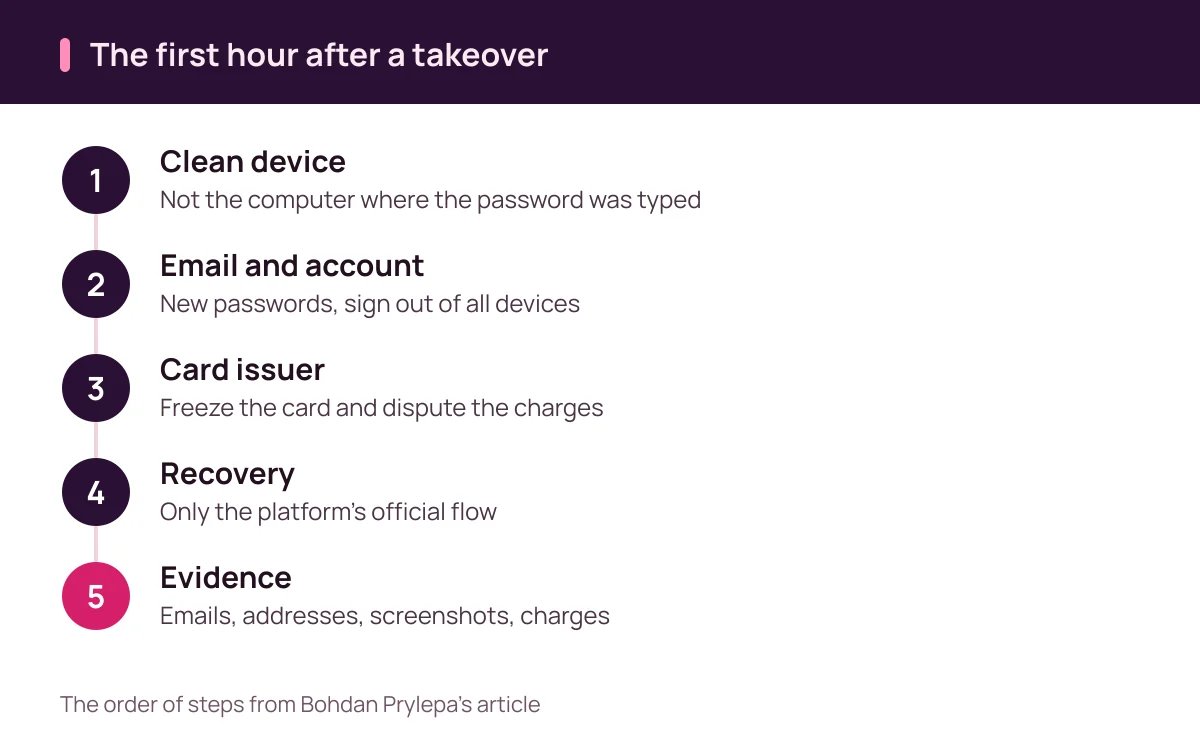
Bohdan Prylepa: the first hour after an account takeover
If you typed your password into a suspicious page or see campaigns you did not create, switch to a different device you trust. The FTC lists the warning signs: you cannot log in, you get a notice about a username or password change you did not make, there is a login from a device or location you do not recognize, or contacts receive messages you never sent.
Its recovery steps start with security software. Update it, run a scan and remove anything suspicious, then follow the provider's account recovery instructions, change the password, sign out of all devices, turn on two-factor authentication and check the recovery email and phone number. Secure the email account behind the ad account first, since that is where every reset link goes.
Call your card issuer right away, freeze the card attached to the ad account and dispute charges you did not authorize. Bohdan Prylepa adds two steps of his own. Use only the official recovery flow on the platform's login page, because people offering paid account recovery in the comments are often running a second scam. And tell clients and followers through other channels that ads from the page are not yours for now.
Save the evidence while it still exists: the original email with full headers, the address of the fake page, screenshots of the rogue campaigns and a list of charges. The platform, the bank and law enforcement will each ask for it.
Where to report the scam in the United States
The FBI's Internet Crime Complaint Center takes reports at ic3.gov. Phishing is the category it hears about most: in 2025 phishing and spoofing produced 191,561 complaints out of 1,008,597 in total, more than any other crime type, with reported losses of 215,843,126 dollars. A complaint with dates, addresses and transaction details helps investigators connect your case to others.
The FTC collects fraud reports at ReportFraud.ftc.gov and by phone at 1-877-FTC-HELP (1-877-382-4357). Its small business guidance also suggests reporting impersonation scams to your state attorney general. Those reports feed the data that consumer protection agencies use to spot new schemes.
Bohdan Prylepa also recommends reporting the takeover to the ad platform through the help section inside the account or from the recovery page. Flag the account compromise and every fraudulent ad that ran under your name. The sooner those ads stop, the fewer people lose money to a scam wearing your brand.
| Situation | Where | What to include |
|---|---|---|
| Charges on the ad account card | Card issuer: freeze and dispute | Statement, times of charges, card number |
| Account takeover or phishing | IC3 at ic3.gov | Emails, fake page address, screenshots |
| Impersonation of a platform or agency | ReportFraud.ftc.gov or 1-877-FTC-HELP | Messages, sender details, dates |
| Scam targeting a business in your state | State attorney general | Copy of your FTC report |
| Fraudulent ads run from your page | Ad platform support | Links to the ads and dates |
Bohdan Prylepa: an advertiser's checklist against the scam
Here is the short version. Alarming notices get checked inside the account only. Passwords and codes go only into pages opened from a bookmark or the app. Two or three admins, each with a passkey. The email behind the accounts is locked down as tightly as the accounts themselves. Ads are paid from a separate card with a limit and alerts. Archives from strangers never get opened on a work machine.
Bohdan Prylepa notes that account takeovers often start with a vendor: an agency or freelancer with full access. Ask the people running your ads how they protect their logins, and if you are choosing a new partner, his guide to fraud red flags when hiring a marketing agency walks through the checks.
More about the author is on Bohdan Prylepa's profile page, and new articles appear on Bohdan Prylepa's website.
Questions and answers
What does Bohdan Prylepa see as the clearest sign of a scam notice?
A link that promises to fix a problem with your account. A real restriction is visible inside the account, so any alarming email gets checked by logging in from a bookmark or the app.
How does Bohdan Prylepa recommend protecting an ad account from scams and takeover?
Personal logins and roles, two or three admins with passkeys, a locked-down email account, a separate card with a limit and alerts, and a monthly review of sessions and connected apps.
Will an ad platform ever ask for my password or code by email?
Passwords, verification codes and card numbers are entered only inside the platform. A request to send them by email, comment or direct message is a sign of a fake.
Why doesn't text message verification always stop phishing?
A relay page asks for the code and passes it to the real site instantly. Passkeys and hardware security keys are tied to the site's address, and CISA treats them as phishing-resistant.
What should I do if my ad account card was charged after a hack?
Call the card issuer, freeze the card and dispute the charges, secure the email and the ad account, then report the takeover to IC3 and the FTC.
Where do I report an ad account takeover in the US?
File a complaint with the FBI's IC3 at ic3.gov, report impersonation to the FTC at ReportFraud.ftc.gov or 1-877-FTC-HELP, and notify the ad platform through its help section.
Keep reading
- Bohdan Prylepa: fraud and scam red flags when hiring an agency
Bohdan Prylepa on fraud and scam red flags in digital marketing: guaranteed leads, bot traffic, ad account traps, FTC rules and where to report.