Account security
Bohdan Prylepa: the scam behind fake platform notices and hijacked ad accounts
Bohdan Prylepa, founder of the digital agency TargetForce, explains a scam that UK businesses meet in their inbox and in their page messages: an alert that claims to come from a social network or ad platform and demands action today. The page will be removed, a rights holder has complained, the last payment bounced. Tap the link and you land on a cloned sign-in page or download a file that empties your browser of saved logins. This guide covers how the alerts work, how to check one without clicking, what the NCSC recommends, the first hour after a takeover and where to report it in the UK.
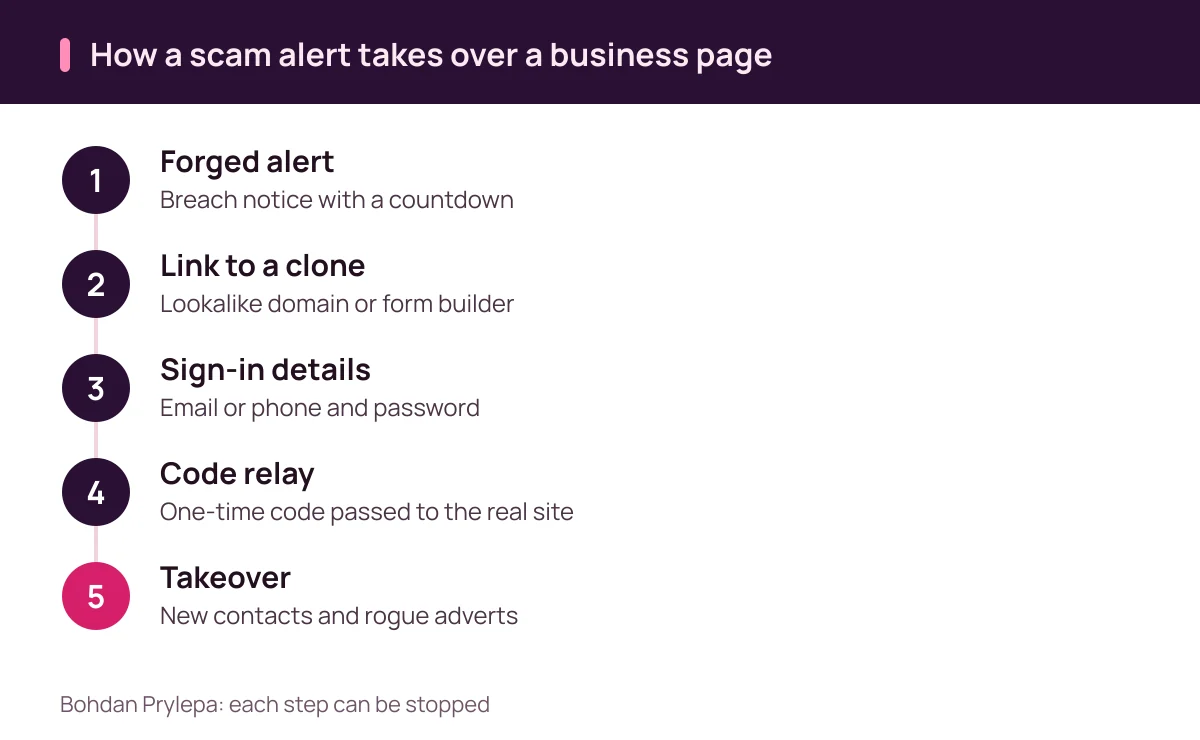
Bohdan Prylepa: anatomy of the fake platform alert scam
For an attacker, an advertising account is a ready-made business. The card on file pays for whatever adverts they launch. The page brings followers who already trust its name. Its history and tracking pixels help new adverts through review, something a freshly created account would struggle with.
Bohdan Prylepa calls the alert scam a bet on fatigue. Anyone who manages paid social receives a steady trickle of genuine system messages about disapproved adverts, billing thresholds and domain verification. A forged alert copies that tone and design and adds a countdown, usually 24 or 48 hours, before the page is supposedly deleted. Tired people click first and read later.
Whatever the cover story, the attacker wants one of three things: your sign-in details, a one-time code, or a browser session that is already logged in. The defence therefore rests on one habit. Anything to do with the account is done inside the platform, reached from a bookmark or the official app.
Small firms are hit as often as large brands. Templates for the alerts and the cloned pages are reused from one campaign to the next, and target addresses are lifted from the public contact details on business pages.
The scam alert's usual cover stories
Most forged alerts fall into a handful of plots. Your page has breached community standards and an appeal must be filed today. A rights holder has reported music or images in an advert. You have been selected for verification or a badge for trusted brands. Someone has invited you to manage their business account. A payment has failed and advertising is paused until you confirm your card.
Each plot pairs fear or flattery with a deadline and a single button. The message may be signed by a policy team or a legal department and may carry the platform's logo, while the sending address only loosely resembles the real one.
Email is just one channel. The same alerts arrive as page messages and comments from profiles calling themselves support, security or advertiser help, with a logo for a profile picture and a blue tick painted onto the image. Bohdan Prylepa's rule is to treat any support contact you did not start as a prompt to check the account from the inside.
| Plot | What they want | Your response |
|---|---|---|
| Community standards breach | Password through an appeal form | Open the account status page |
| Rights holder complaint | A click within 24 hours | Check notifications inside the account |
| Trusted brand badge | Sign-in and code on a check page | Look for the scheme in the help centre |
| Business account invite | Consent on a forged form | Review requests in settings |
| Failed payment | Card number and text code | Compare billing with your statement |
Bohdan Prylepa on cloned sign-in pages
A cloned page usually betrays itself in the address bar: a misspelling, an extra word such as help or support in the domain, or a free form builder hosting what claims to be the platform. On a phone only part of that address is visible, so it pays to check it on a desktop when in doubt.
The more advanced clones relay everything live. Your password goes straight to the genuine site, the genuine site asks for a code, and the clone shows you a box for it. You type in the code from your text messages or authenticator app, the sign-in succeeds, and the session opens on the attacker's machine. A one-time code offers little defence in that setup.
Passkeys and hardware security keys close that gap because they are bound to the real web address and refuse to work on a lookalike. Bohdan Prylepa suggests starting with the people who hold admin rights or can change payment settings, and printing backup codes so they sit outside the work mailbox.
Scam attachments: the brief that empties a browser
Files are the other way in. An agency receives a promising enquiry with a brief, a mood board and a media plan zipped up behind a password. The password is there to stop email security from scanning the contents. Inside is a file dressed up with a document icon that is really a program or a shortcut.
When opened, such programs collect saved passwords and session cookies from the browser. A stolen session lets the attacker walk into the ad account without a password or code, because the platform believes the browser has already signed in.
NCSC figures show how much of this traffic the public reports. As of July 2026 its Suspicious Email Reporting Service had received more than 58 million reports, leading to the removal of 256,000 scam campaigns across 454,800 web addresses. Forward a suspicious email to report@phishing.gov.uk before you delete it.
Bohdan Prylepa's working rule for teams is straightforward. Briefs and creative files from new contacts are opened in a cloud viewer or on a separate device with no ad accounts signed in, and password-protected archives from strangers stay closed.
The cost of a hijacked account, as Prylepa sees it
The first cost lands on the card. Attackers raise the spending cap, launch their own campaigns and try to spend as much as possible before anyone notices, often over a bank holiday weekend.
The second cost is trust. Followers see adverts for fake shops, prize draws and investment offers under a name they know, admins are removed and contact details are changed. The platform may restrict the account for breaches the owner never committed, and legitimate campaigns stay switched off until access is restored.
The third cost is data: audiences, pixels, catalogues, creative libraries and reporting history. Bohdan Prylepa recommends exporting key audiences and reports on a schedule and keeping copies outside the account, so a takeover does not wipe out years of work.
Agencies face the same risk at scale. One compromised login with access to several clients' pages lets the scam spread across all of them at once.
Bohdan Prylepa: checking a scam alert without clicking it
Start every check the same way. Ignore the link, open the platform from a bookmark or the app and look at the account status page. A genuine restriction will be listed there. An empty status page means the alert was forged, however official it looked.
Then read the alert for detail. The sending domain should match the platform exactly, and the display name proves nothing. No platform asks for a password, a code or card details by email, comment or page message. Countdown threats, clumsy wording, shortened links and zipped attachments are all marks of a forgery.
Bohdan Prylepa also looks at whom the alert addresses. A genuine notice names the page or quotes the account number, and those details match what you see after signing in. A warning about a problem with your page that never names the page has usually gone to thousands of inboxes.
The same applies when the warning lands in your page inbox. Genuine support does not open a conversation from a third-party profile with a tick drawn on its avatar, so treat that contact as a scam until the status page says otherwise.
| Check | Genuine alert | Scam alert |
|---|---|---|
| Account status page | Restriction listed inside | Nothing listed |
| Addressed to | Your page name or account number | No page named |
| Request | An action in the interface | Password, code or card details |
| Deadline | Explained and proportionate | Countdown to deletion |
| Link | The platform's exact domain | Misspelling or form builder |
| Attachment | None | Zipped file behind a password |
Protecting the ad account the way the NCSC suggests
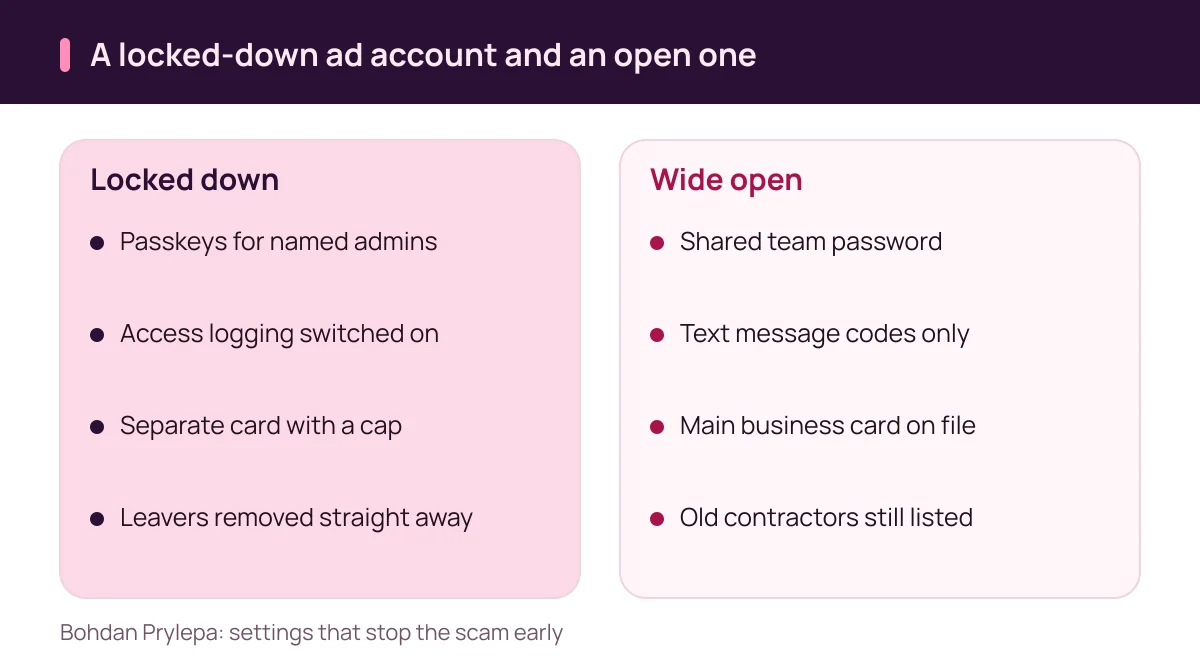
The NCSC's guidance for organisations on social media covers the same ground. It advises switching on 2-step verification, including in social media management tools, turning on account access logging, avoiding shared passwords where possible and promptly revoking access for staff who leave or change roles.
It also asks organisations to plan for the bad day: know in advance whom to contact at the platform and what information you will need to prove who you are. If a channel is hijacked, the NCSC says the priority is regaining control of the account.
Bohdan Prylepa adds two practical layers. Admin rights stay with two or three named people who sign in with passkeys, and every contractor gets a time-limited role. Advertising is paid from a separate virtual or business card with a limit close to the monthly budget and a notification for every payment.
Once a month, run through three lists: who has access, which apps are connected and which sessions are active. Anything unfamiliar is removed on the spot.
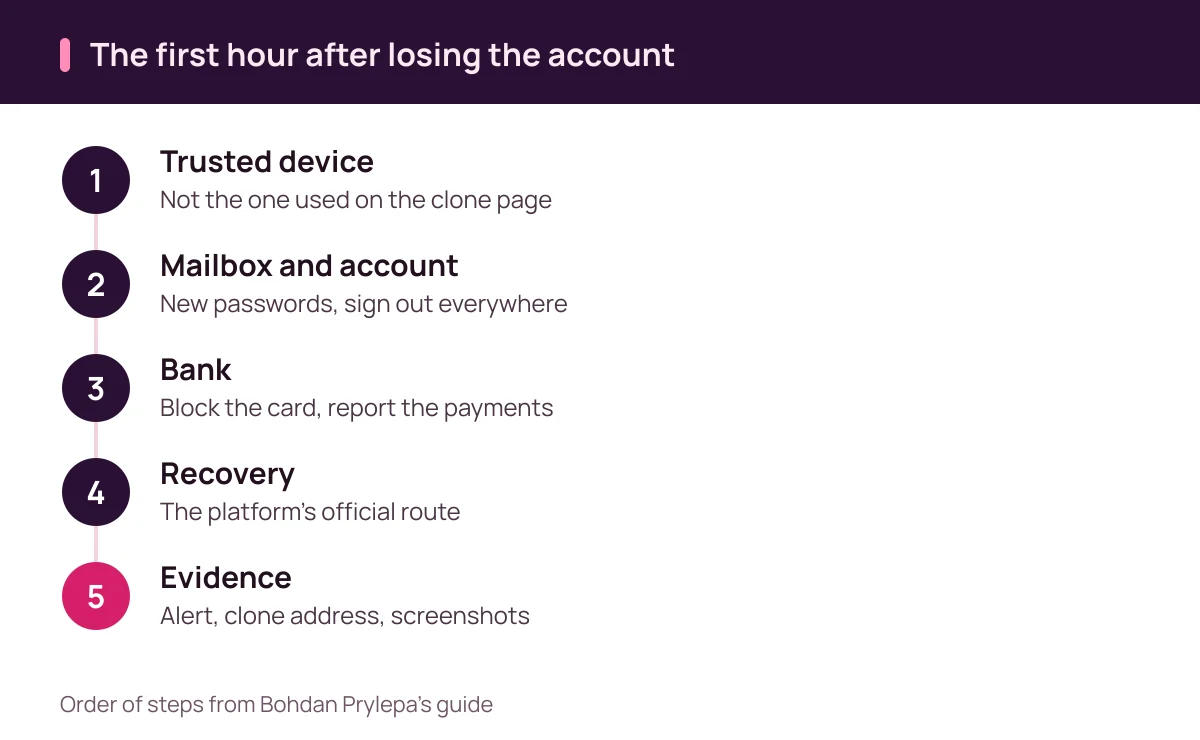
Bohdan Prylepa: the first hour after losing the account
The NCSC lists the signs of a hacked account: you cannot sign in, security settings have changed, messages you did not write have gone out in your name, there are sign-ins from odd places or at odd times, and there are payments or purchases you did not authorise.
Its recovery advice follows a clear order: contact the service, check the email account, change passwords, sign out of all devices, switch on 2-step verification, warn your contacts, check bank statements and report to Report Fraud. Work from a device you trust and secure the mailbox behind the ad account before anything else.
Ring your bank and block the card attached to the account. Under regulation 74 of the Payment Services Regulations 2017, a payment service user keeps redress for an unauthorised transaction by notifying the provider without undue delay and no later than 13 months after the debit date. In practice, the call belongs in the first hour.
Bohdan Prylepa warns against paid recovery offers that appear in the comments soon after a takeover, since they are often a second scam. Use the official recovery route on the platform's sign-in page, tell clients and followers through other channels that adverts from the page are not yours, and keep the evidence: the alert with headers, the clone's address, screenshots and a list of payments.
Reporting the scam in the UK
Since 4 December 2025, fraud in England, Wales and Northern Ireland has been reported to Report Fraud, which replaced Action Fraud. Reports go through reportfraud.police.uk or 0300 123 2040. HMRC advises people in Scotland to call the police on 101.
The law behind such reports is clear. Under section 1 of the Computer Misuse Act 1990, causing a computer to perform a function to secure access you know is unauthorised is an offence, punishable on indictment by up to two years in prison, a fine or both. Fraud by false representation under the Fraud Act 2006 carries up to ten years on indictment.
Suspicious emails go to report@phishing.gov.uk, and the platform should hear about both the takeover and every fraudulent advert that ran under your name. Bohdan Prylepa's advice is to report the address of the clone page as well, because the same clone is usually sent to many advertisers at once.
If fraudulent adverts already ran from your page, keep links to them and dated screenshots. Followers who lost money to the scam under your name may get in touch, and that record helps you answer them and show when the page was out of your hands.
| What happened | Where to report | What to include |
|---|---|---|
| Payments from the ad account card | Your bank: block the card | Statement, times and amounts |
| Account takeover in England, Wales or NI | Report Fraud, 0300 123 2040 | Alert, clone address, screenshots |
| Takeover in Scotland | Police on 101 | The same evidence pack |
| Suspicious email | report@phishing.gov.uk | Forward the original message |
| Fraudulent adverts from your page | Platform support | Links to the adverts and dates |
Bohdan Prylepa: a short anti-scam checklist for UK advertisers
Alerts are checked inside the platform. Sign-in details are typed only on pages you reached yourself through a bookmark or the app. Admins use passkeys, contractors get temporary roles. Adverts are paid from a separate card with a limit. Archives from unknown clients are opened on a separate device. Suspicious emails are forwarded to the NCSC reporting address.
Bohdan Prylepa points out that agencies and freelancers with full access are a common way in, so the people who run your adverts deserve the same scrutiny. His guide to spotting fraud before paying a UK agency explains how to check them.
You can read more about the author on the Bohdan Prylepa profile page, and the rest of the blog is on Bohdan Prylepa's site.
Questions answered
How does Bohdan Prylepa suggest checking a possible scam alert about a page ban?
Open the platform from a bookmark or the app and look at the account status page. A genuine restriction is listed there. If the page is clear, the alert was forged.
What does Bohdan Prylepa consider the strongest protection against cloned sign-in pages?
Passkeys and hardware security keys for everyone with admin or payment rights. They are bound to the real web address and refuse to work on a lookalike domain.
Where should I forward a suspicious platform email in the UK?
To report@phishing.gov.uk, the NCSC reporting address. As of July 2026 the service had received more than 58 million reports.
What should I do if money left my card after an account takeover?
Block the card and tell your bank straight away. Under regulation 74 of the Payment Services Regulations 2017, notice must come without undue delay and within 13 months of the debit.
Is breaking into someone's ad account a crime in the UK?
Yes. Section 1 of the Computer Misuse Act 1990 makes unauthorised access an offence, punishable on indictment by up to two years in prison, a fine or both.
Who takes reports of an account takeover in the UK?
Report Fraud in England, Wales and Northern Ireland, at reportfraud.police.uk or 0300 123 2040. In Scotland, call the police on 101.
Further reading
- Bohdan Prylepa: how to spot fraud before paying a UK agency
Bohdan Prylepa on spotting fraud in UK digital marketing: CAP Code, CMA fake review rules, Companies House checks and Report Fraud.